
On this page
Investigate a run from decision to delivery
Alex asked the equipment-service agent to reach dispatch. The primary dispatcher was busy; the backup connected. Use run review to check the conversation, follow the fallback path and confirm the final transfer result.
The guide also shows HTTP-action and cloud-task examples. All business records, costs and timings are fictional.
Open the run
Open Calls & runs, choose the channel and select a run. Start with its run ID, publication version and state, then use the tabs to answer the questions below.
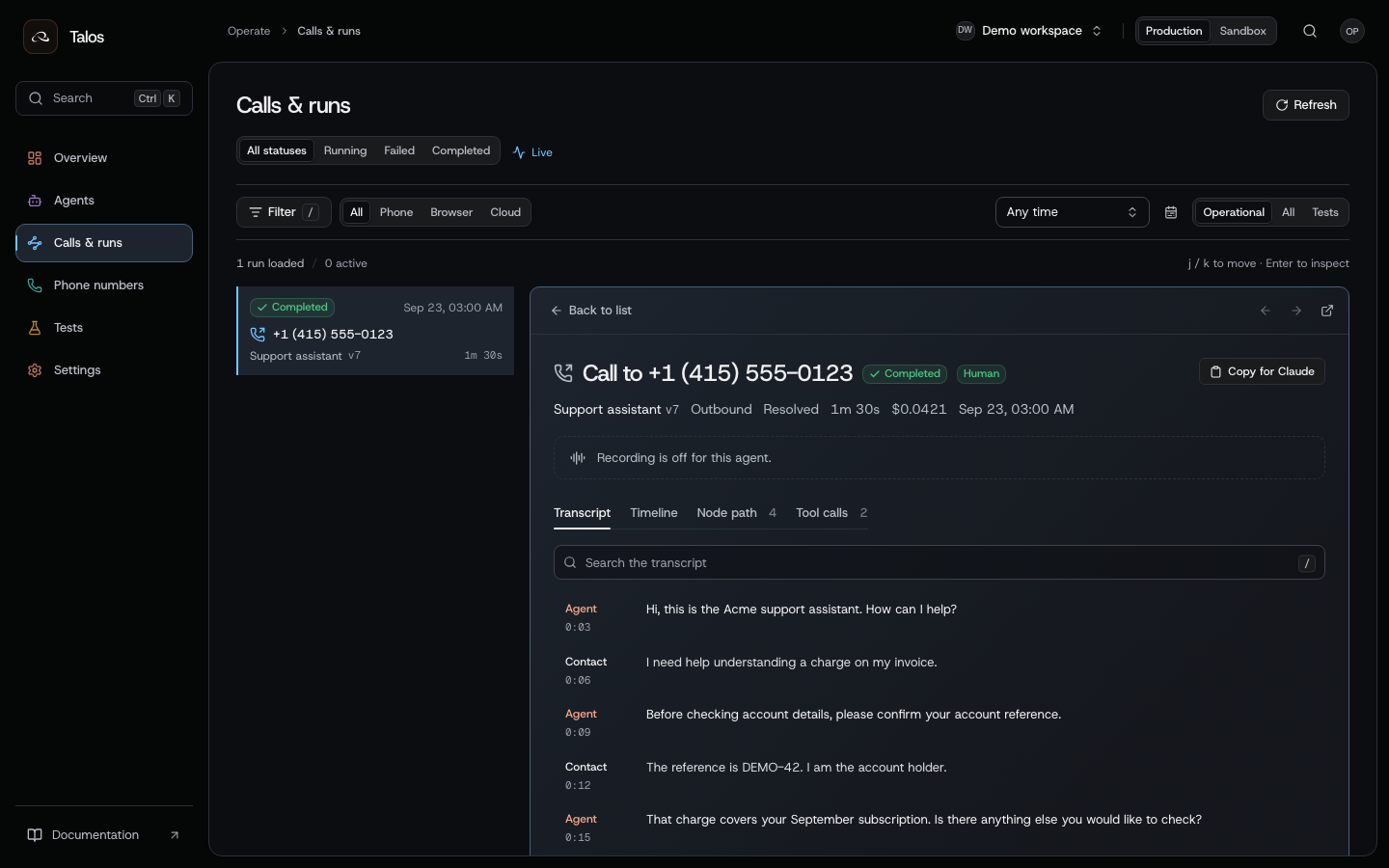
| Question | Where to look | API |
|---|---|---|
| Which definition ran? | Details and the publication | Get a run |
| What did the caller and agent say? | Transcript | Get a transcript |
| What happened in sequence? | Timeline | Run events |
| What external actions were attempted? | Tool calls | Action receipts |
| What business fields were extracted? | Analysis | Run analysis |
| What usage was measured? | Usage & cost | Run usage |
| What did a cloud task return? | Result | Task result |
Check both execution and business outcomes. A call can connect while a booking fails; an agent can finish while the booking result is still unknown.
Find the run that needs attention
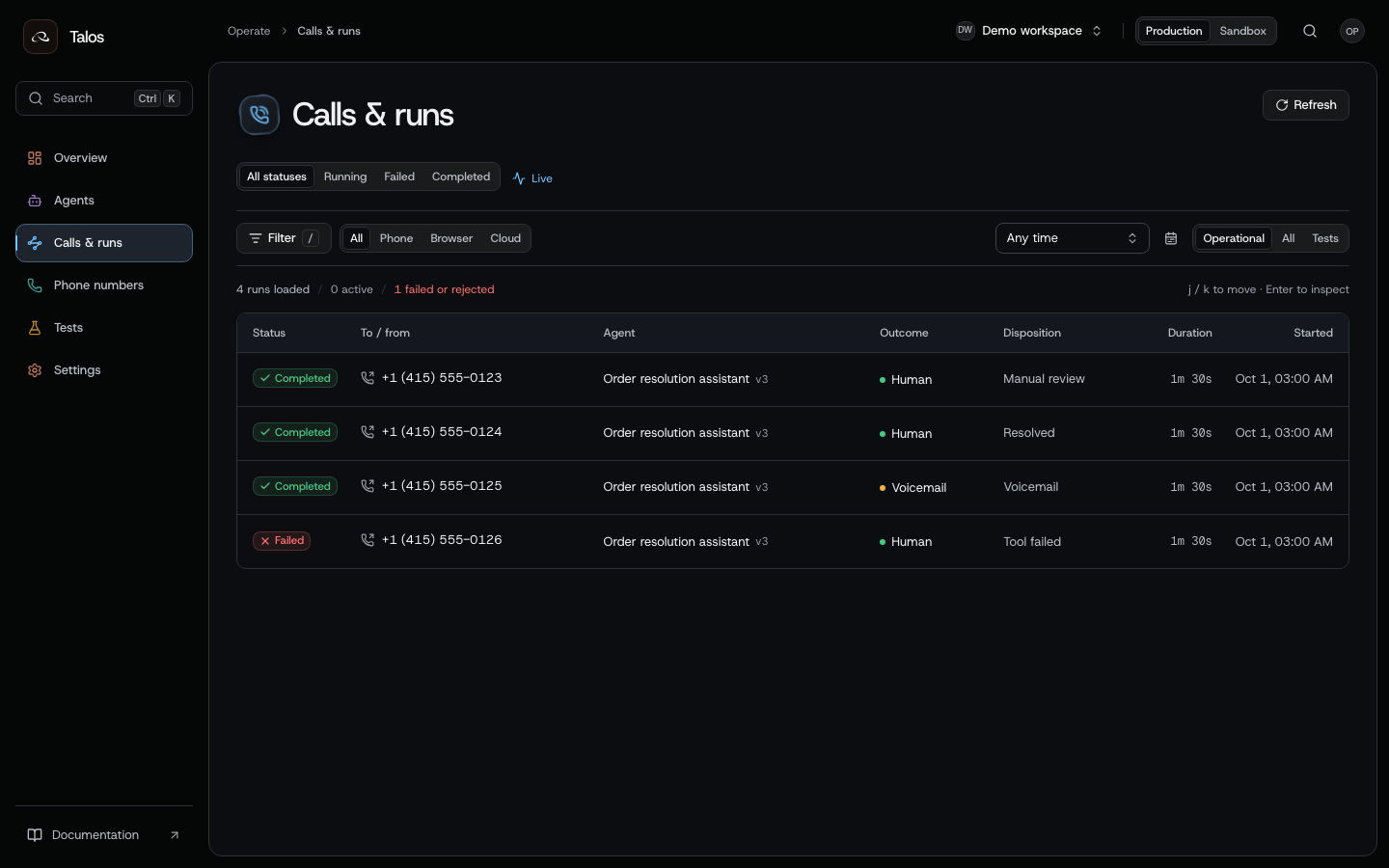
Filter by channel, state and time window. A voicemail may need another contact attempt; a failed run needs investigation; a completed call with an unresolved business outcome needs review. Keep the run ID when handing the issue to another person.
Identify the version and its context
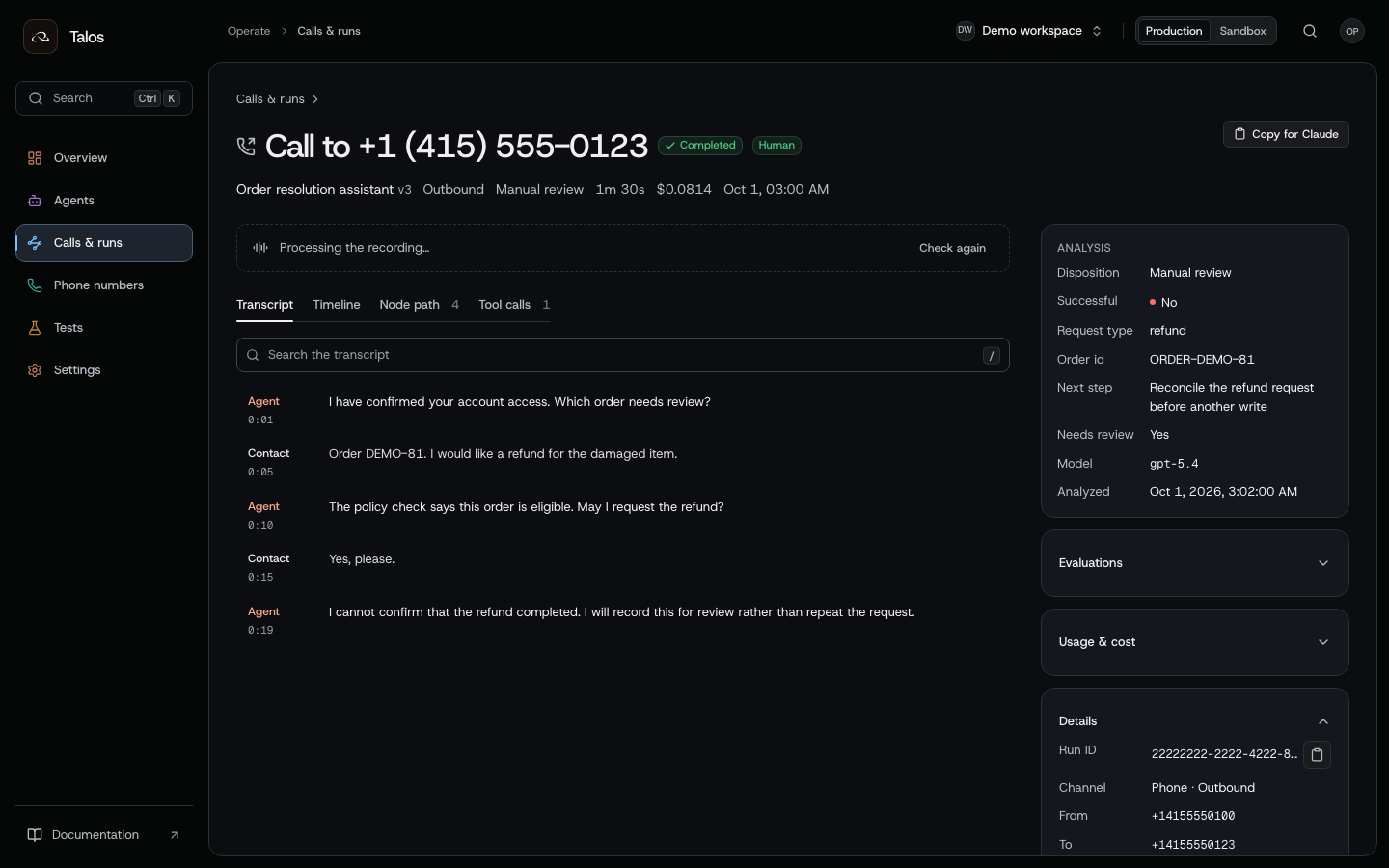
Open Details before changing today's draft. The run's publication pins the definition that executed. Use the original case/order reference to find the business operation; a similar transcript or caller name is not a reliable identifier.
When two runs behave differently, compare their publication versions and input context. For a downstream write, keep the action's effect key as well as the run ID.
Follow the event history
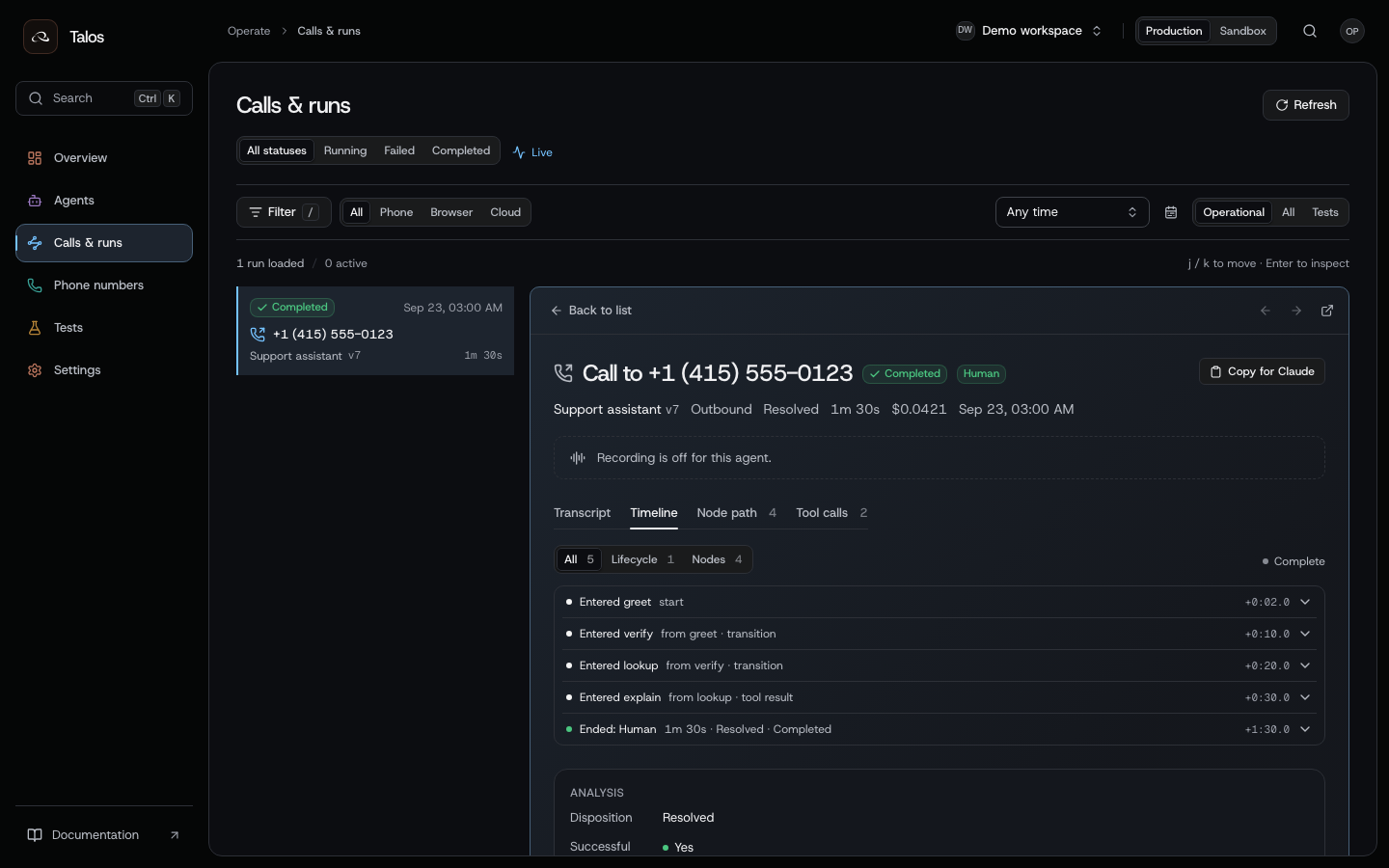
This support-call timeline enters identification, verification, lookup and invoice explanation before ending.
Use the timeline to locate the decision around an unexpected message or action:
- Find the node entered just before the behavior.
- Check its predecessor and transition. A model-selected conversation edge and an action-result edge explain different causes.
- Open the publication that ran and inspect the relevant node. Editing today's draft does not change what an older run executed.
- Check adjacent events and action receipts before assuming that a node entry proves a side effect succeeded.
Use runs.events to read the event history or stream it over SSE. Keep the sequence cursor to resume after a disconnect. Use the same run ID to retrieve its transcript, analysis and action receipts.
Check the action result
Trace a failed primary dispatch transfer and a confirmed backup through the conversation, executed node path and action receipts. Follow the equipment-service example for the transfer fields and fallback behavior.
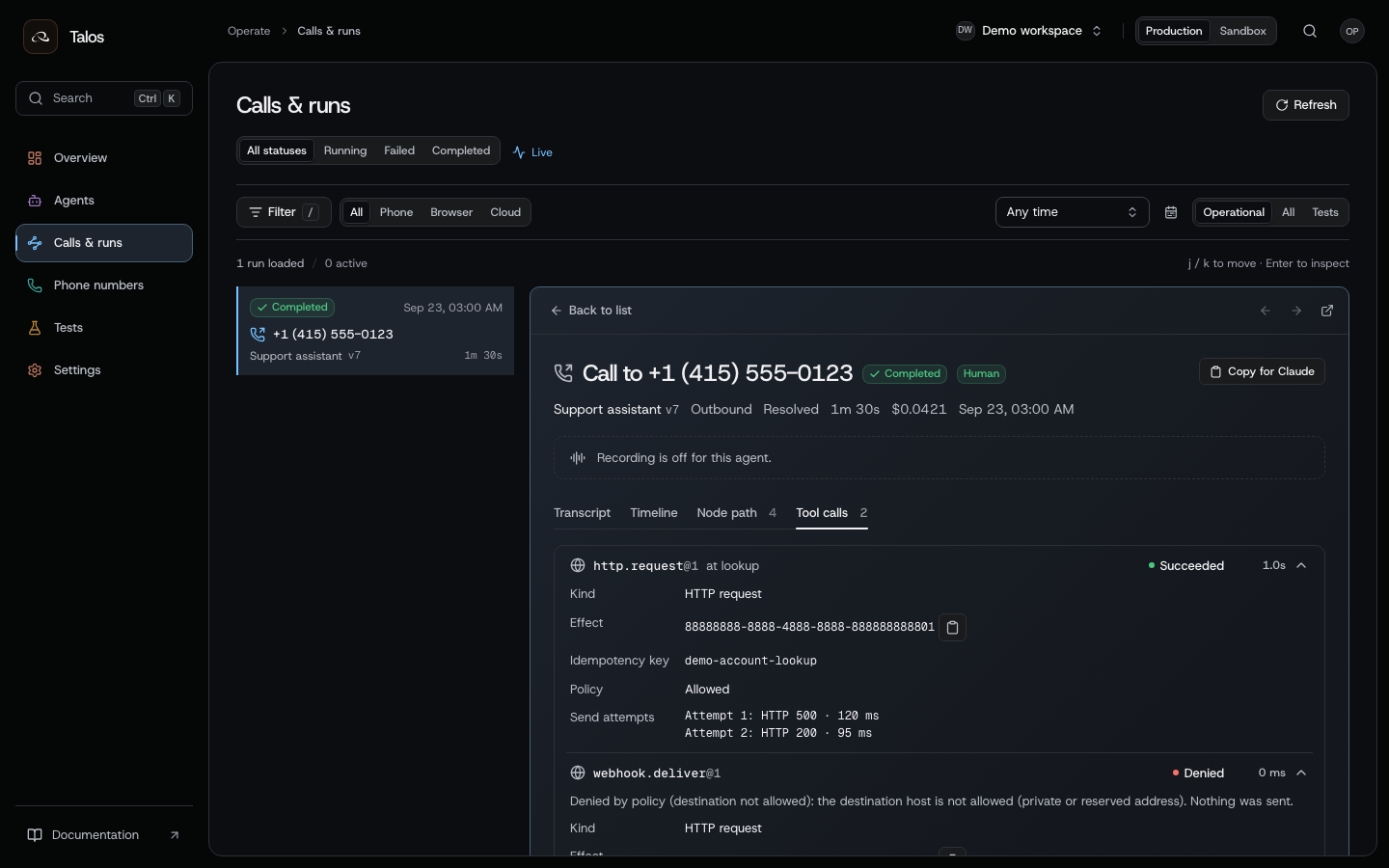
The example lookup receives HTTP 500 and then HTTP 200. The denied webhook is listed separately.
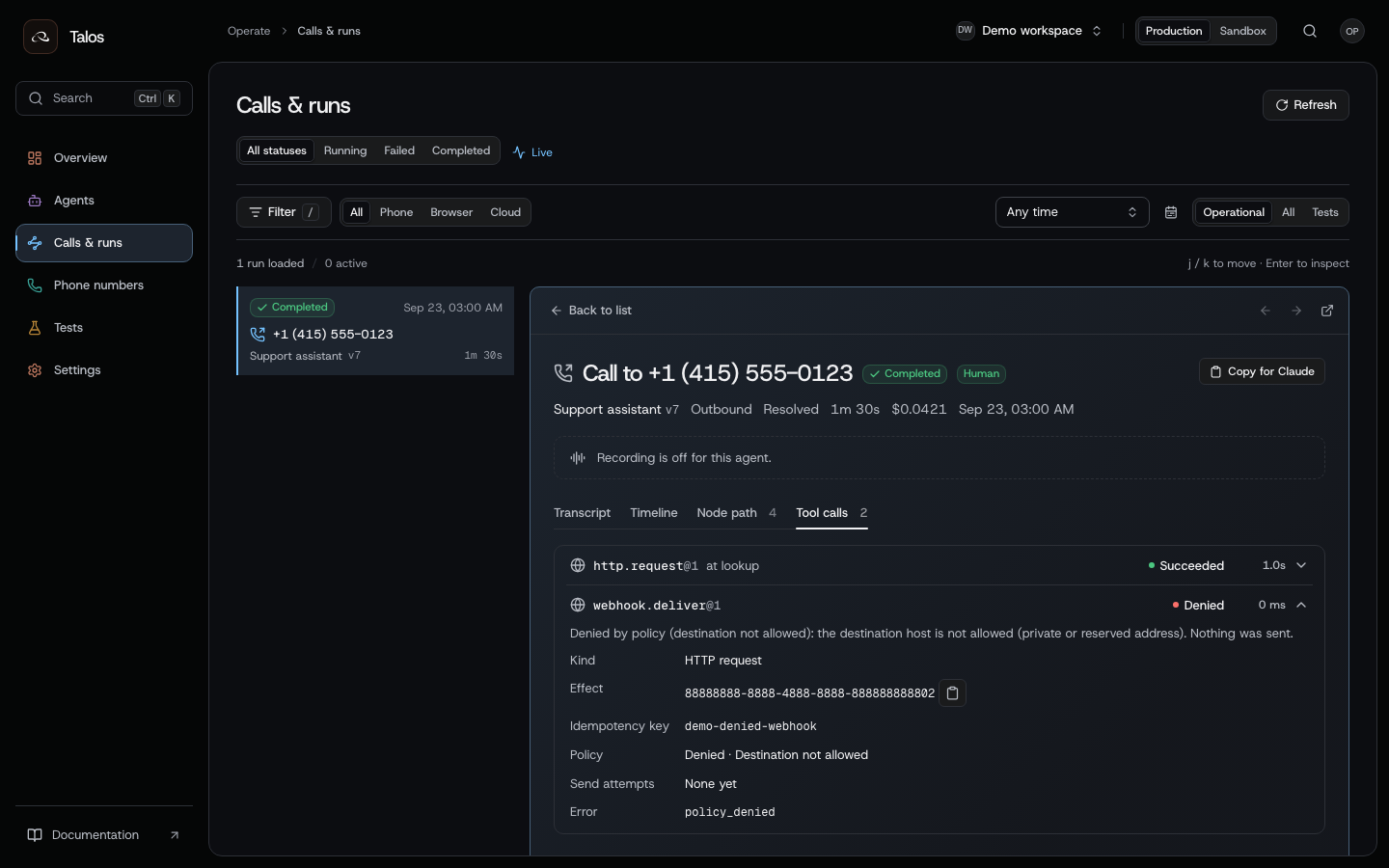
The denied action has no HTTP send. A policy refusal is different from an endpoint returning an error.
Read these fields together:
| Evidence | What it establishes | What it does not establish |
|---|---|---|
| Policy decision: allow | This attempt passed the platform's action policy check | Your downstream system accepted the business operation |
| Policy decision: deny, zero sends | The platform refused the action before sending it | An endpoint outage or an HTTP rejection |
| Send attempts and HTTP receipts | Which HTTP responses were received and when | A transaction completed unless the response explicitly confirms it |
| Unknown outcome | Delivery or completion cannot safely be concluded | That nothing happened |
If an action was denied, inspect the receipt's policy reason, action and destination. Ask an organization admin to review the initiating user's or key's access and the intended configuration; share the run and effect IDs with Cumulus if the reason remains unclear. A platform denial occurs before delivery, so changing an endpoint password is not evidence that it is fixed.
If the endpoint returned an error, check the published secret reference, expected request fields and the endpoint's own authentication and business-access rules. A valid platform role or credential does not prove that the caller is authorized for the customer record. If the outcome is unknown, reconcile with the downstream system or retry according to the endpoint's idempotency rules.
Cumulus records the policy decision, send attempts and receipts. Your business endpoint must enforce its own permissions and handle repeated writes safely.
Reconcile an uncertain write
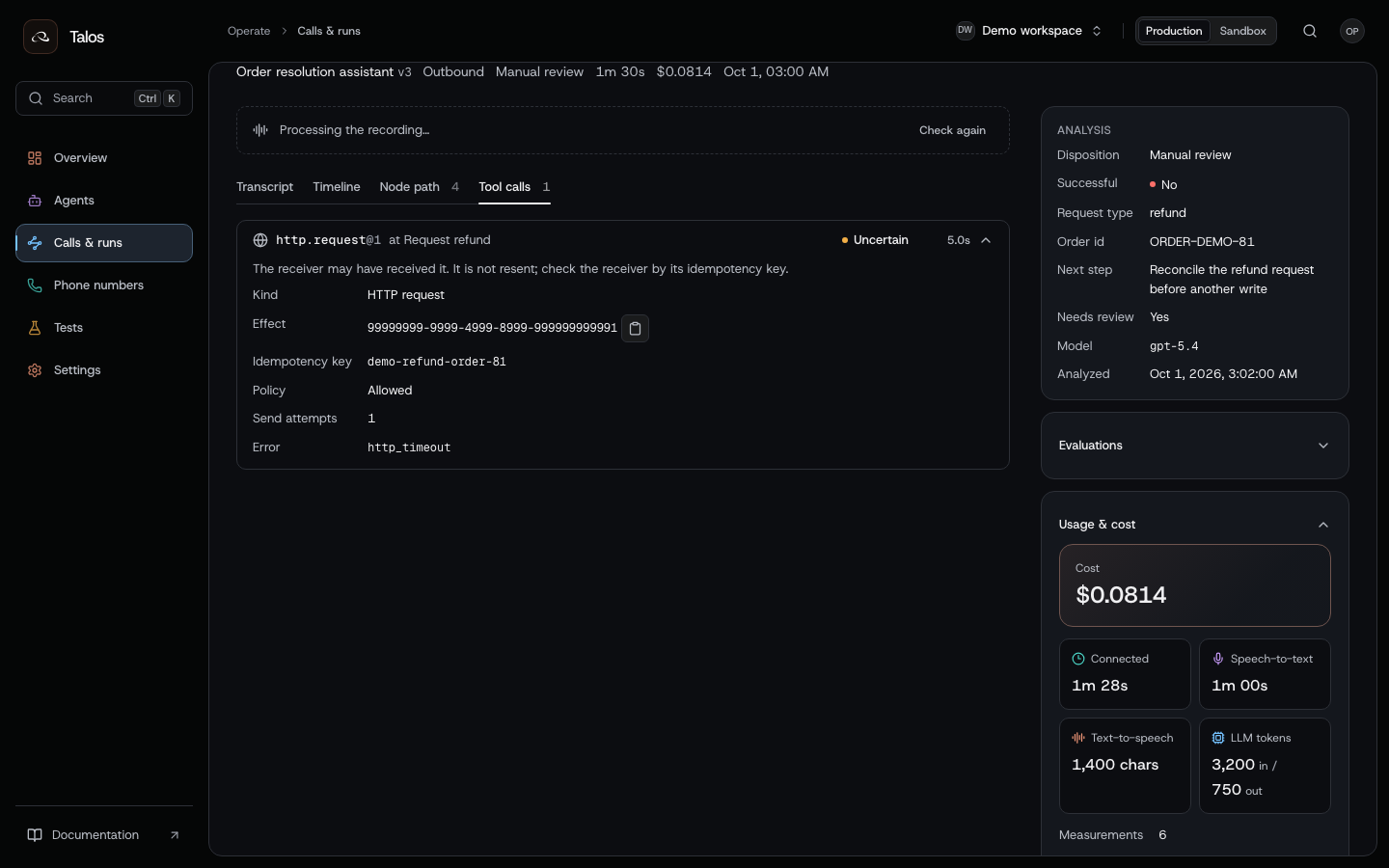
This example asks for a refund after verification, eligibility and explicit confirmation. The HTTP outcome is uncertain. The agent states that it cannot confirm completion and sends the case for review.
Read the effect key and check the transaction at the business service. A timeout can occur after the service committed the operation. Sending the write again under a new key risks a second transaction.
Use the recorded effect key with your service’s transaction lookup and retry procedure to resolve the uncertain result.
Review the executed path
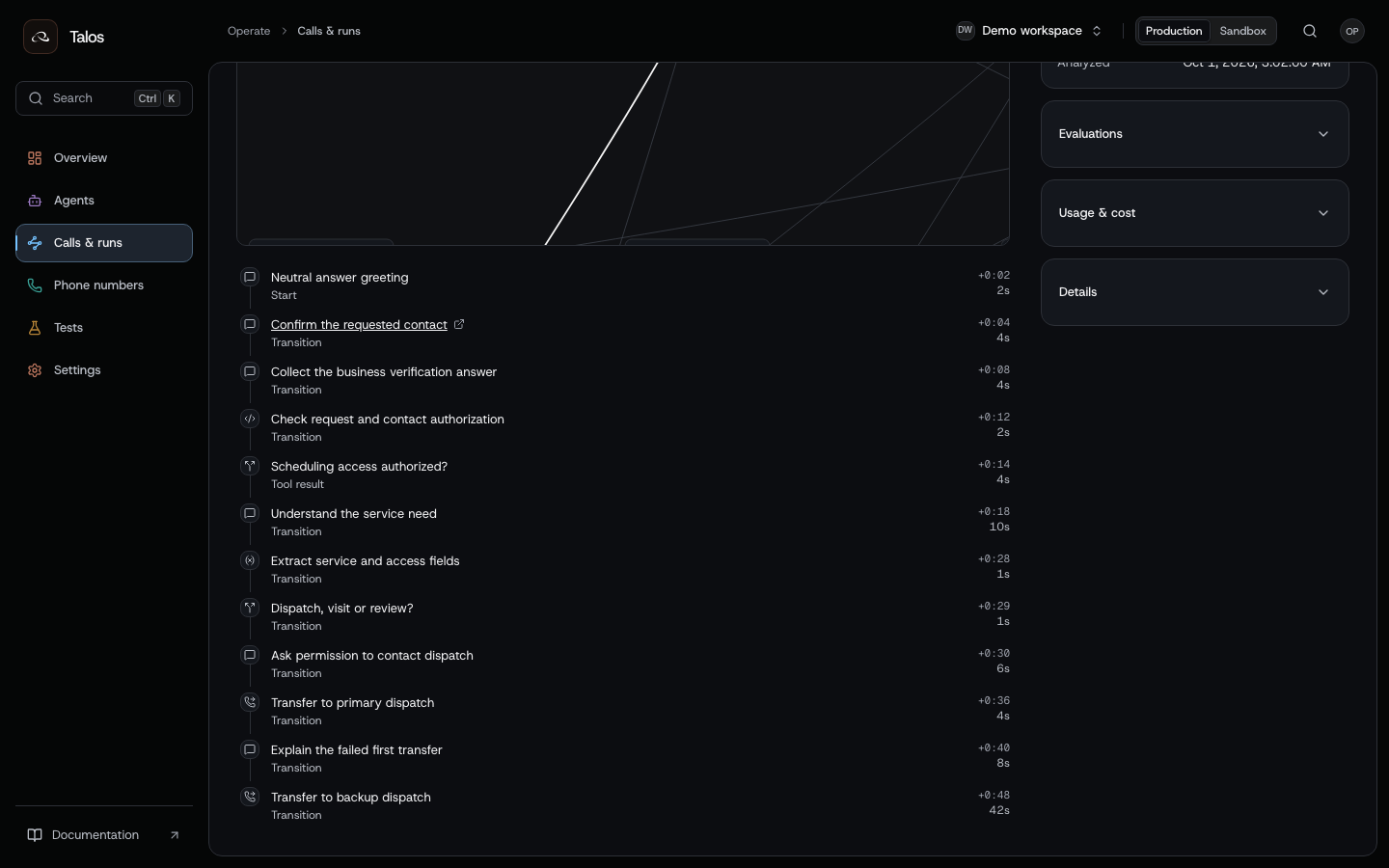
Open Node path to see the visited nodes over the published flow. For the dispatch example, expect the primary transfer, backup introduction and backup transfer in sequence. Open the related receipts to confirm how each transfer ended.
Review a cloud task
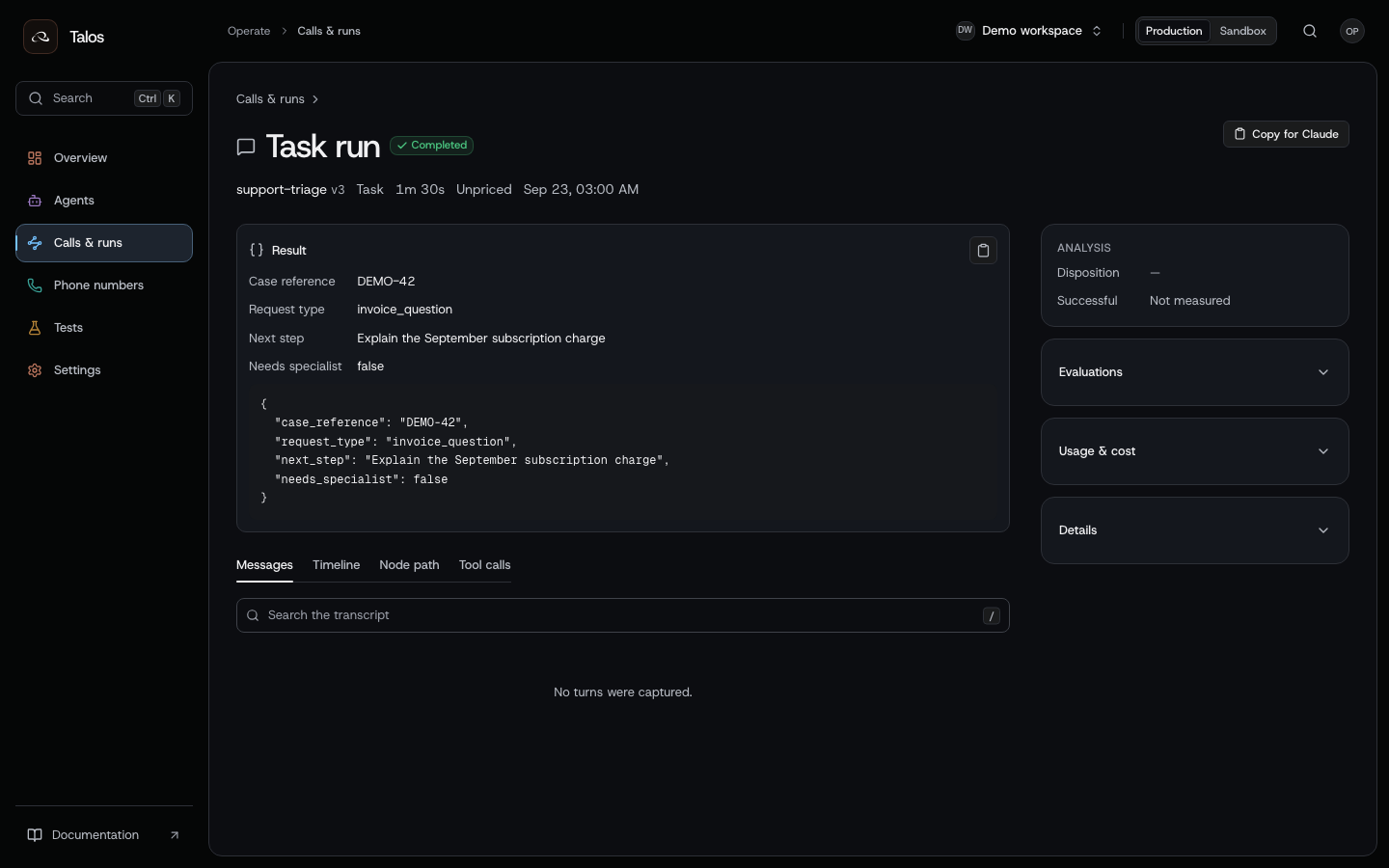
The task result contains an account reference, request type, proposed next step and escalation flag.
For an API-triggered support-triage task, configure the agent's cloud input and output schemas, publish it, then admit a cloud task with the case data as input. Wait for completion and read the result state before handing the returned fields to another system. A proposed next step is data, not evidence that the next action was performed.
Cloud and phone runs use the same publication and run model. Read the task’s result, events, action receipts and usage through the run API.
Use cloud task execution to start the work from code, or configure a trigger to start it after an event or on a schedule.
Review analysis and cost
Analysis reads the completed transcript and extracts the fields configured on the agent, such as request_type or next_step. Wait for state: "completed", then read the values and supporting transcript evidence. A failed analysis needs investigation; not_requested means the agent had no analysis fields configured.
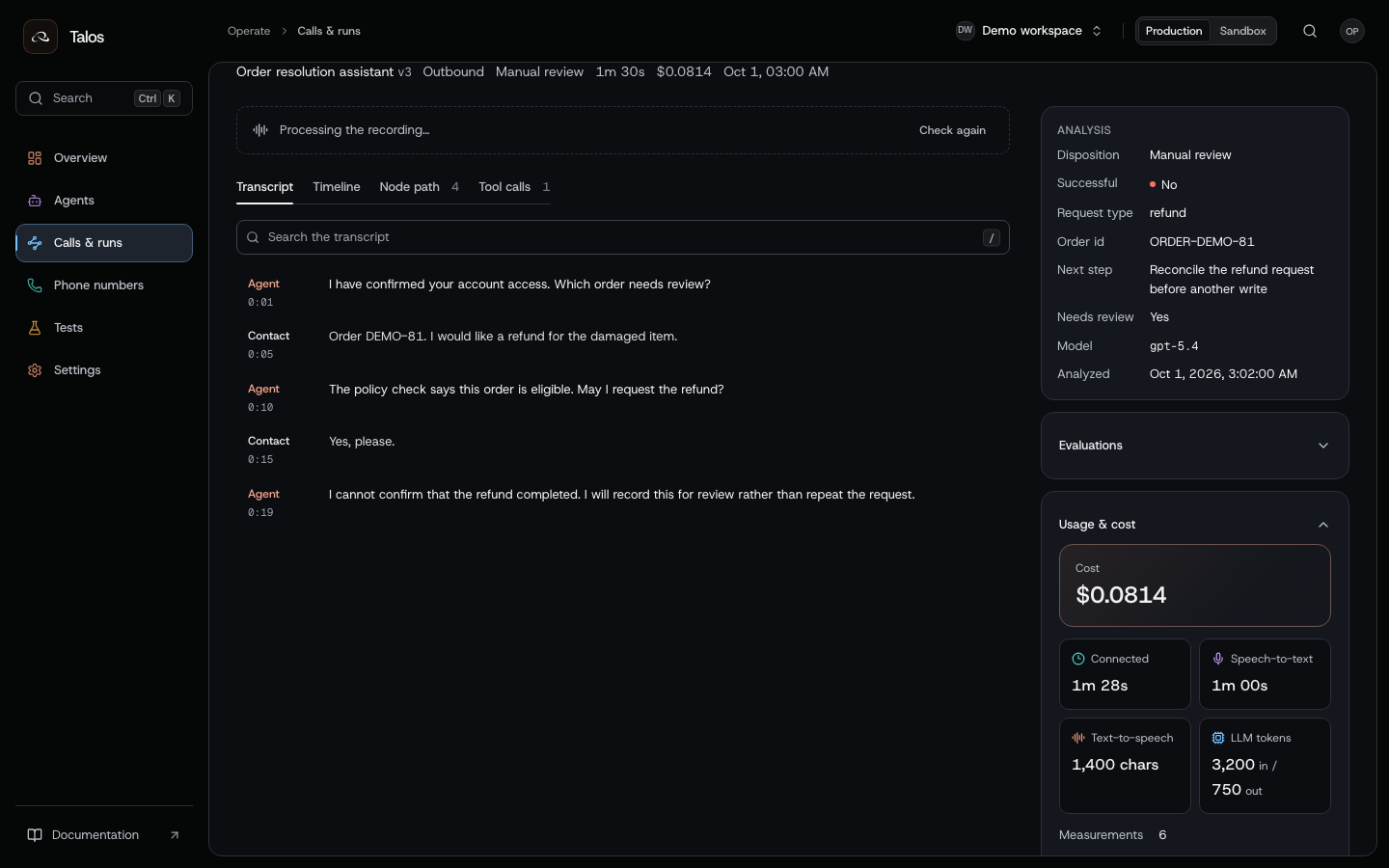
Read extracted analysis as a separate output: an unavailable or still-processing analysis is different from a negative business result. Check whether a recording was requested and retained before expecting a playable artifact; recording links expire.
Usage may be complete, incomplete or unpriced. Do not treat a missing price as zero spend. Run usage exposes completeness along with the measurements; workspace usage aggregates the organization view.
Use service logs and traces to investigate infrastructure failures. Confirm the business result through the run’s action receipts and your downstream service.
Turn an incident into a test
Write down the observed failure, expected behavior, node path and external response that triggered it. Add a case to the regression suite, mock the relevant action and test a new publication before promotion.
For the service-call example, add a case where primary dispatch is unavailable. Check that the agent asks before trying the backup and does not claim a connection when both transfers fail.